11. Configure merge policies
By the end of this chapter you will know how to inspect a repository’s merge policies, adjust a policy safely in Git, and promote a shadow policy to live.
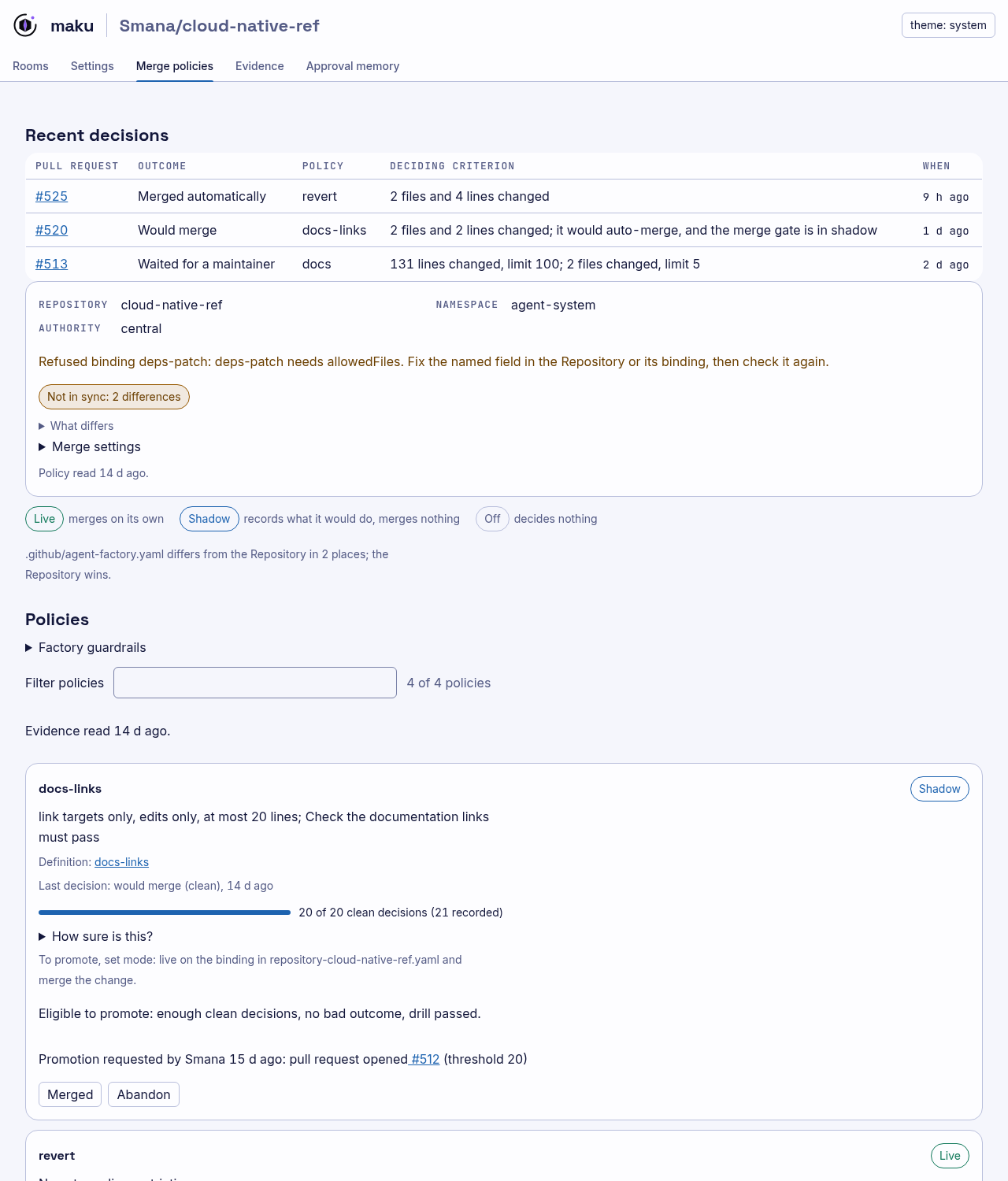
A MergePolicy defines a class of change the factory’s merge gate can evaluate, and each Repository binds the policies it uses with a mode (live, shadow, or disabled). Every served repository starts with Maku’s shipped catalog (docs-links, deps-patch, and docs) in shadow mode, so humans review every pull request until a maintainer explicitly promotes a policy.
Full field schemas, guardrails, and worked YAML recipes live in Use › Merge policies and Reference › Web UI settings.
Inspect policies in Settings
Open Settings › Merge policies (/settings) in the rooms web UI to see every policy bound to your repositories, its current mode, its conditions, and the shadow evidence it has collected.
Change a policy safely
Policies are managed as code — either in your cluster’s Repository / MergePolicy manifests or, once policyManagement.stage: manage is active, in .github/agent-factory.yaml inside the target repository:
- Edit the binding or policy. Narrow
allowedFiles, tighten line/file caps, or disable a catalog policy (mode: disabled). CentralmergeGuardrailsalways cap what a repository binding can ask for. - Validate before pushing. Use the Settings editor’s check button or run
maku config validate/maku policy explainlocally so typos or guardrail violations fail fast before review. - Simulate against past pull requests. Check how the edited policy would have classified recent pull requests before switching it on.
- Open a pull request. A maintainer reviews and merges the policy change; agents are forbidden from modifying policy files or protected paths.
Promote a policy
A shadow policy becomes live through a pull request that changes its binding’s mode from shadow to live.
- Check evidence in Settings. A policy is eligible once it has enough agreed shadow decisions (pull requests the gate would have merged that a maintainer merged unchanged at the same head) and the repository has passed a rollback drill.
- Use Promote to live (or open the PR by hand). When eligible and
Factory.spec.gitopspoints at the repository’s manifest, the Settings page offers Promote to live, which opens a pull request containing the one-linemode: livediff. - Review and merge the pull request. Nothing merges a promotion automatically. Once merged, unattended merges under that policy are guarded by the daily cap, required CI checks, the post-merge monitor, and the regression breaker.
See Merge policies › Promotion for every eligibility threshold and rollback step.
Next: chapter 12 sets up scheduled repository upkeep routines.